Introduction to VivoScript
VivoScript is a scripting language built into VivoQuant. Its primary goal is to enable task automation, making it easier to streamline repetitive or complex workflows.
With VivoScript, nearly all functionality in VivoQuant can be accessed programmatically, making it a powerful tool for advanced users.
It is based on ECMAScript/JavaScript, a widely-used scripting language in web development. However, VivoScript lacks some of the newer JavaScript features.
JavaScript Syntax
To get familiar with JavaScript fundamentals, we recommend visiting the free Codecademy course: Codecademy Introduction to JavaScript (lessons 1–6 and 8).
Note: Some modern JavaScript features are not supported in VivoScript. VQ6 will work with
letandconstin place of always usingvar. Below we will use both.
Basic Data Types
Numbers
var myNumber = 123;
var myDecimal = 1.234;
let myDivision = 1 / 234;
Strings
let firstName = "User";
var fullName = "User " + "Last Name";
Booleans
var isActive = true;
let isFinished = false;
var isGreater = (5 > 2);
Arrays
var emptyArray = [];
var numberArray = [1, 2, 3, 4];
let mixedArray = [1, "apple", true, [4]];
Objects
let person = {"name": "Ana", "age": 30};
var settings = {"isDarkMode": true};
var emptyObject = {};
Objects and Methods
JavaScript supports object-oriented programming. Objects can have properties (data fields) and methods (functions).
Example:
let user = {};
user.name = "Ana";
user["age"] = 30;

VQ.showMessage("Hello world");
⚠️ Note: Arrays are technically objects:
var myArray = [1, 2, 3, 4];
myArray.push(5);
var length = myArray.length;
Control Structures
Conditional
if (role == "admin") {
    // do something
} else if (role == "editor") {
    // something else
} else {
    // default case
}
Loops
for (var i = 0; i < 10; i++) {
    // repeat 10 times
}

while (true) {
    // repeat until break
    break;
}

do {
    // run at least once
} while (true);
Other array functions are, for instance, concat, join, reverse, sort, unshift, shift.
Functions
Functions are reusable blocks of code. They accept input values and can return results.
function add(x, y) {
    return x + y;
}
var sum = add(2, 3);

function isApple(name) {
    return name == "apple";
}
var result = isApple("orange");  // false

function sayHello() {
    VQ.showMessage("Hello!");
}
sayHello();
The VQScript Toolbar
Adding Script Shortcuts to the Toolbar
Shortcuts for commonly executed VQScripts can be added to the Quick Scripts menu on the VQScript toolbar
To add a Quick Script shortcut:
-
Go to Tools->Configuration and click on the VivoScript tab.
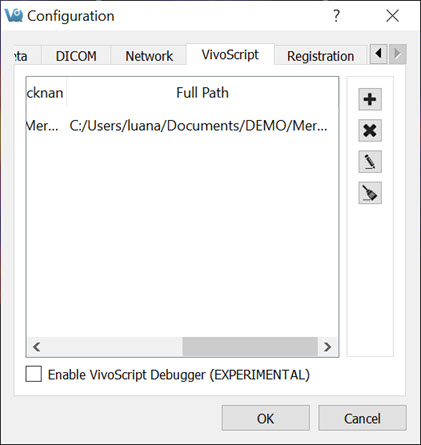
- Select a script for which quick access is desired by clicking the Add Quick Script button
 and navigating to the directory where the script is saved.
 - Add a nickname for the script in the dialog box that appears.
- The script will now appear in the configuration window as well as in the Quick Scripts menu on the VQScript toolbar.
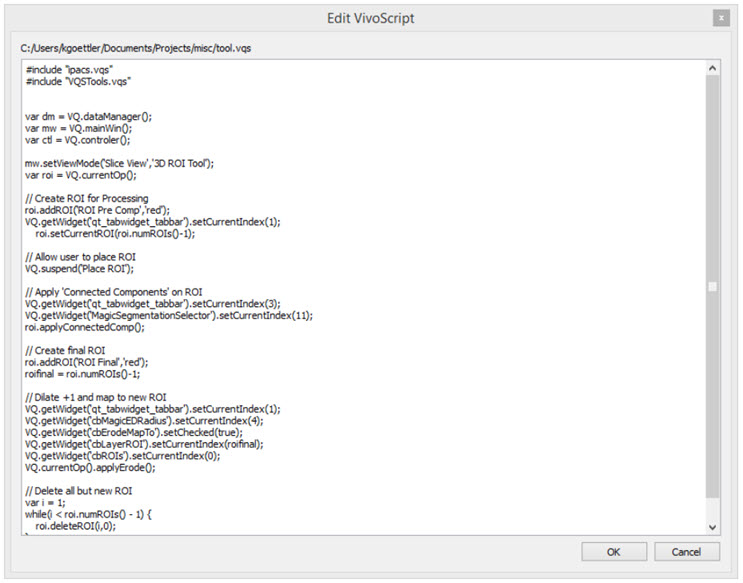
Quick Scripts can be edited directly from the VQScript toolbar by clicking on the Edit VivoScript button  . A window will appear in which the user can edit the script.
Using the Peek Tool
The Peek Tool is used to reveal the names of elements (called widgets) in the operator GUIs for use in scripts. The command VQ.getWidget("widgetName") can then be used to interact with these elements.
For example, to determine the name of the button in the 3D ROI operator that resets all ROIs, click on the Peek button  on VivoQuant’s top bar, and then click on the desired button in the 3D ROI operator operator box. A yellow box containing the class and name of the selected button will be displayed.
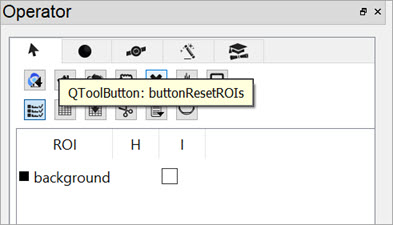
Then, the command VQ.getWidget("buttonResetROIs").click() ca be used to click the button and reset all ROIs.
VQScript Examples
Included with VivoQuant are 30 VQScript example scripts to help you get started working with VQScript. These scripts illustrate some of the many ways VQScript may be used to streamline workflows in VivoQuant. To learn more about each files, see the VQScript Example Scripts page.
VQScript Classes
Click here to see the list of VivoScript Classes.